Stand with Ukraine flag
Pricing Try it now

SCADA Swimming pool

SCADA systems are generally divided into two types: Traditional, which focuses on basic monitoring and control, and High-Performance, emphasizing streamlined interfaces, faster decision-making, and enhanced operational efficiency.

View live demo

The main advantage of SCADA (Supervisory Control and Data Acquisition) systems is their ability to monitor production processes in real time and respond quickly to deviations. ThingsBoard provides comprehensive tools to collect, process, and visualize data from SCADA components, such as PLCs (Programmable Logic Controllers) and RCUs (Remote Control Units), enabling seamless integration with various industrial processes.

To illustrate the flexibility of ThingsBoard's SCADA integration, we have developed the swimming pool management system template. This solution demonstrates how SCADA symbols—such as valves, motors, filters and tanks—can be utilized to create simple yet powerful process control systems. It enables any production process to be visualized on a dashboard, allowing for real-time monitoring of equipment operation and timely detection of alarm signals. The template is designed to accommodate both Traditional and High-Performance SCADA systems.

Traditional SCADA dashboard
High-performance SCADA dashboard

Accelerate your IoT roadmap with our team

Our team is a trusted partner for scalable solutions delivered fast and on a fixed timeline.

Letter icon

SCADA overview

High-performance Traditional
Design approach Simplified, minimalist approach for focused operation Dynamic, visually engaging and interactive design
Color-coded visualization (active) White elements Green elements
Color-coded visualization (inactive) Dark gray elements Dark gray elements
Alarm indicators (warning) Yellow triangle, animated Yellow color, animated
Alarm indicators (critical) Red square, animated Red color, animated
Interactivity Not explicitly interactive Fully interactive components
High-performance Traditional

Design approach

Simplified, minimalist approach for focused operation
Dynamic, visually engaging and interactive design

Color-coded visualization (active)

White elements
Green elements

Color-coded visualization (inactive)

Dark gray elements
Dark gray elements

Alarm indicators (warning)

Yellow triangle, animated
Yellow color, animated

Alarm indicators (critical)

Red square, animated
Red color, animated

Interactivity

Not explicitly interactive
Fully interactive components
How it works

Solution structure

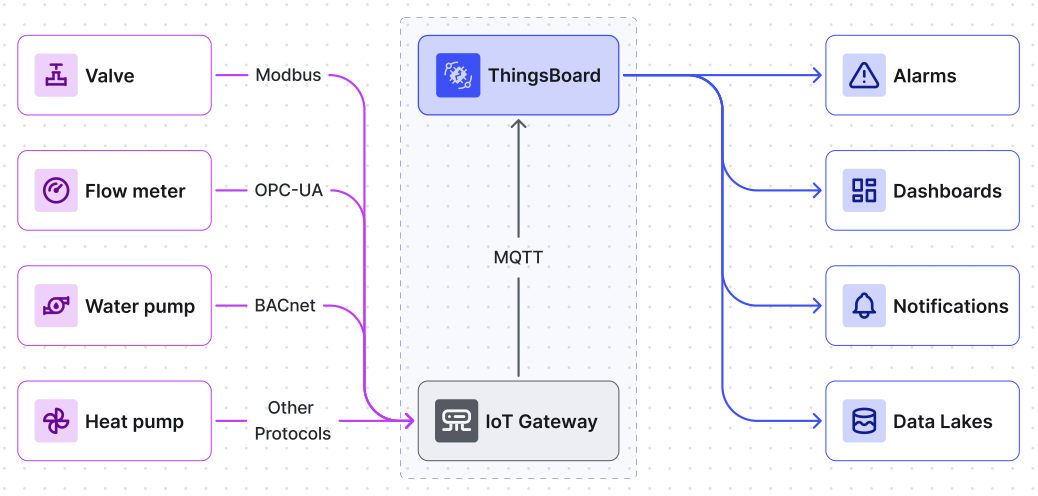
IoT solution architecture: devices connect via protocols and gateways to ThingsBoard for alarms, dashboards, notifications, and data lakes IoT solution architecture: devices connect via protocols and gateways to ThingsBoard for alarms, dashboards, notifications, and data lakes

PLCs and RTUs

Seamlessly integrate your SCADA system with PLCs and RTUs using ThingsBoard integrations and IoT Gateway. Support for Modbus, OPC-UA, BACnet, and other popular protocols ensures reliable real-time data collection and control.

IoT gateway

ThingsBoard's IoT Gateway bridges the gap between legacy SCADA devices and modern IoT platforms. It ensures data reliability with built-in local data storage during network outages and supports efficient protocol conversion, secure data transmission, and centralized device management.

Data processing

Unlock actionable insights with ThingsBoard's robust data processing tools. Perform real-time transformations, apply complex rules, and automate workflows with built-in rule chains and scriptable integrations.

Alarm system

Enhance operational awareness with ThingsBoard's advanced alarm system. Manage incident workflows with features like alarm acknowledgment, clearing, commenting, and configurable escalation rules.

Notification system

Stay informed with ThingsBoard's flexible notification system, delivering alerts via email, SMS, Slack, or custom webhooks. Automate critical notifications based on configurable conditions and thresholds.

IoT dashboards

Visualize your SCADA data with ThingsBoard's real-time IoT dashboards. Design interactive views using SCADA symbols, customizable widgets, and dynamic updates to monitor and control processes seamlessly.

Key functions of SCADA systems

Connectors and flow Direction

These symbols are designed to visualize and organize pipe connections, providing a clear representation of junctions and flow directions.

Examples of SCADA high performance connectors symbols

Fluid filtration

Filter symbols provide visualization and control over filtration processes, ensuring the cleanliness and safety of the liquids being used in the system.

Examples of SCADA high performance fluid filters symbols

Pump monitoring and management

A range of pump symbols (centrifugal, heat, motor pumps) allows for monitoring the performance and efficiency of pump systems. This solution is particularly important for regulating pressure and liquid volumes.

Examples of SCADA high performance pump symbols

Flow regulation

These symbols allow operators to manage fluid flow through pipelines by opening or closing valves remotely. This ensures flexibility in regulating flow rates and isolating system segments during maintenance or emergencies.

Examples of SCADA high performance flow regulation symbols

Tank level monitoring

Tank level meter and reservoir symbols enable operators to monitor liquid levels within the system, preventing both overflow and depletion—critical for water supply and chemical processes.

Examples of SCADA high performance tanks symbols

Scales for Real-Time Monitoring

Scales provide an intuitive way to monitor various parameters in real time, such as temperature, pressure, or flow rate. The scales enable operators to track current values and identify deviations from the desired range, ensuring precise control over system performance.

Examples of SCADA high performance scale symbols

Pipe monitoring and leakage sensors

Drain pipe symbols help visualize areas where potential liquid leaks might occur. In SCADA systems, this solution can be integrated with sensors to immediately alert operators to any issues.

Three examples of pipe monitoring and leakage sensors as dashboard symbols

Fluid filtration

Filter symbols provide visualization and control over filtration processes, ensuring the cleanliness and safety of the liquids being used in the system.

Three examples of fluid filtration dashboard symbols

Pump monitoring and management

A range of pump symbols (centrifugal, heat, motor pumps) allows for monitoring the performance and efficiency of pump systems. This solution is particularly important for regulating pressure and liquid volumes.

Three examples of pump monitoring and management dashboard symbols

Flow regulation

Flow meter and valve symbols allow precise control of fluid flow through pipelines, which is essential for filtration, cooling, and water supply systems.

Three examples of flow regulation dashboard symbols

Tank level monitoring

Tank level meter and reservoir symbols enable operators to monitor liquid levels within the system, preventing both overflow and depletion—critical for water supply and chemical processes.

Three examples of tank level monitoring dashboard symbols

Dashboard structure

Swimming pool SCADA system state

Water pump state

Heat pump state

Sand filter state

Gateway

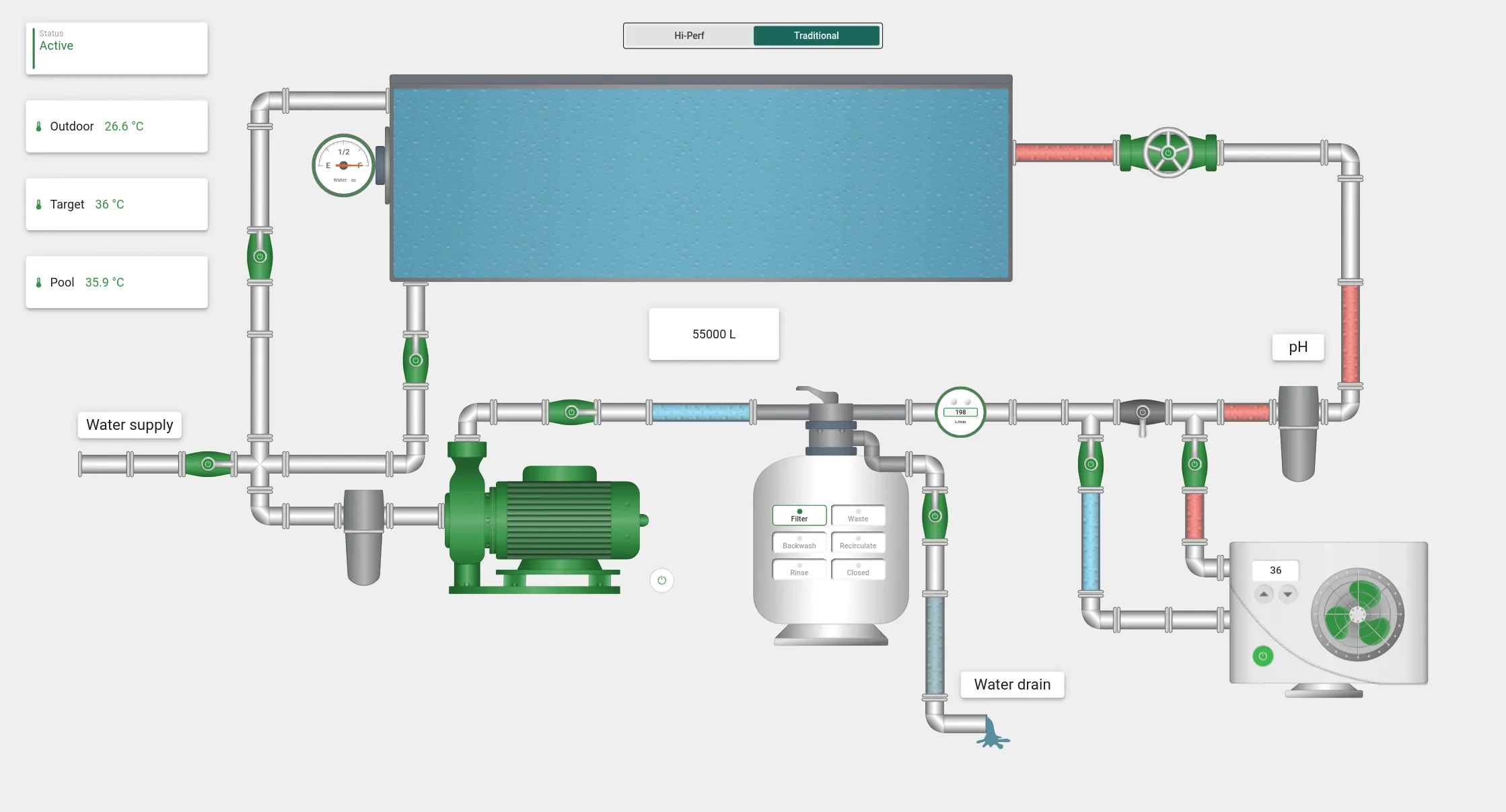
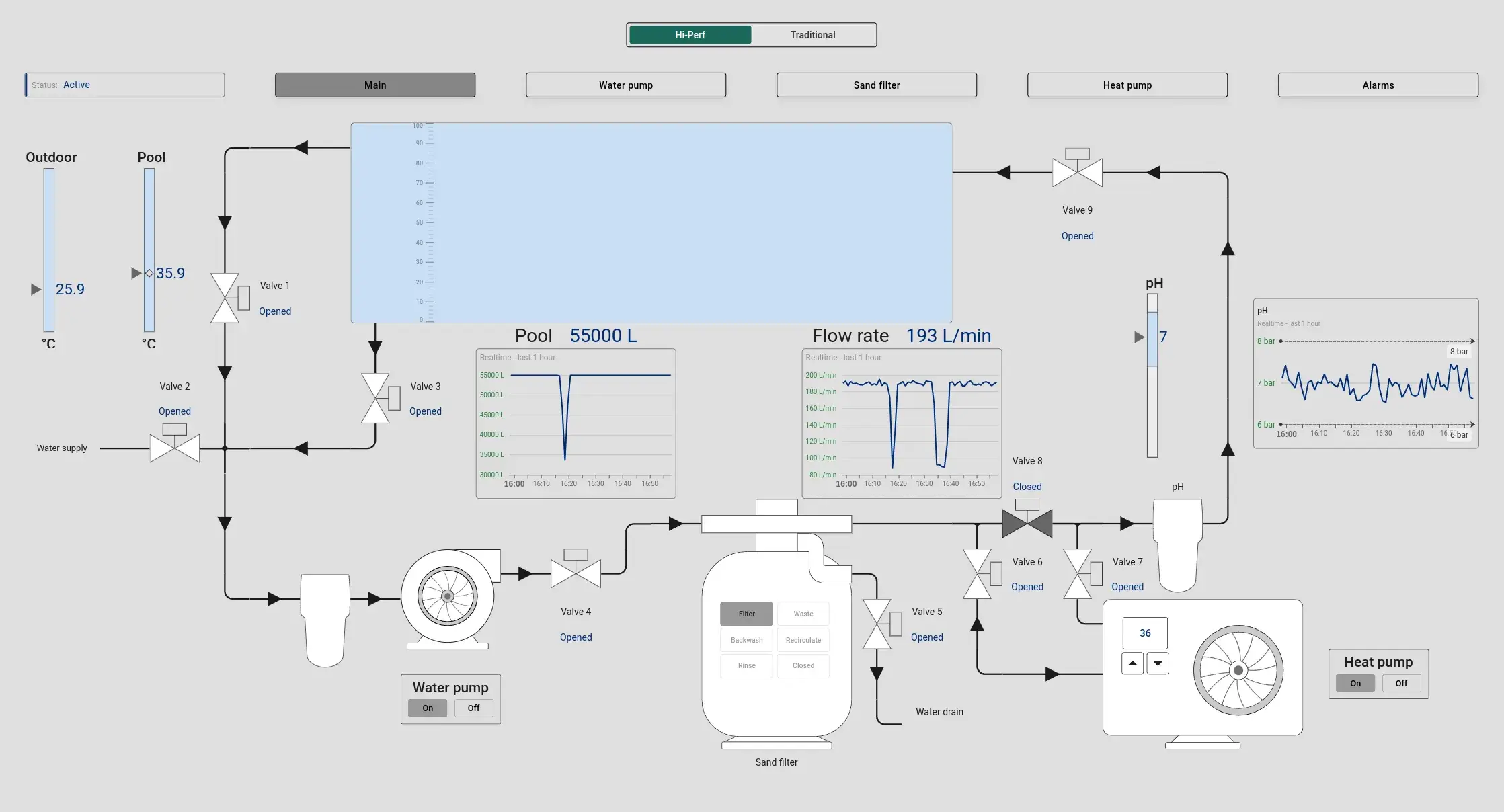
This interactive state allows operators to monitor the pool's water level, temperature, and equipment operation. In real time, users can heat the pool, drain it, or fill it with water. By interacting with the on-screen widgets for water level, temperature, the filter sensor, and the pH filter, operators can access and control readings directly from a single dashboard.
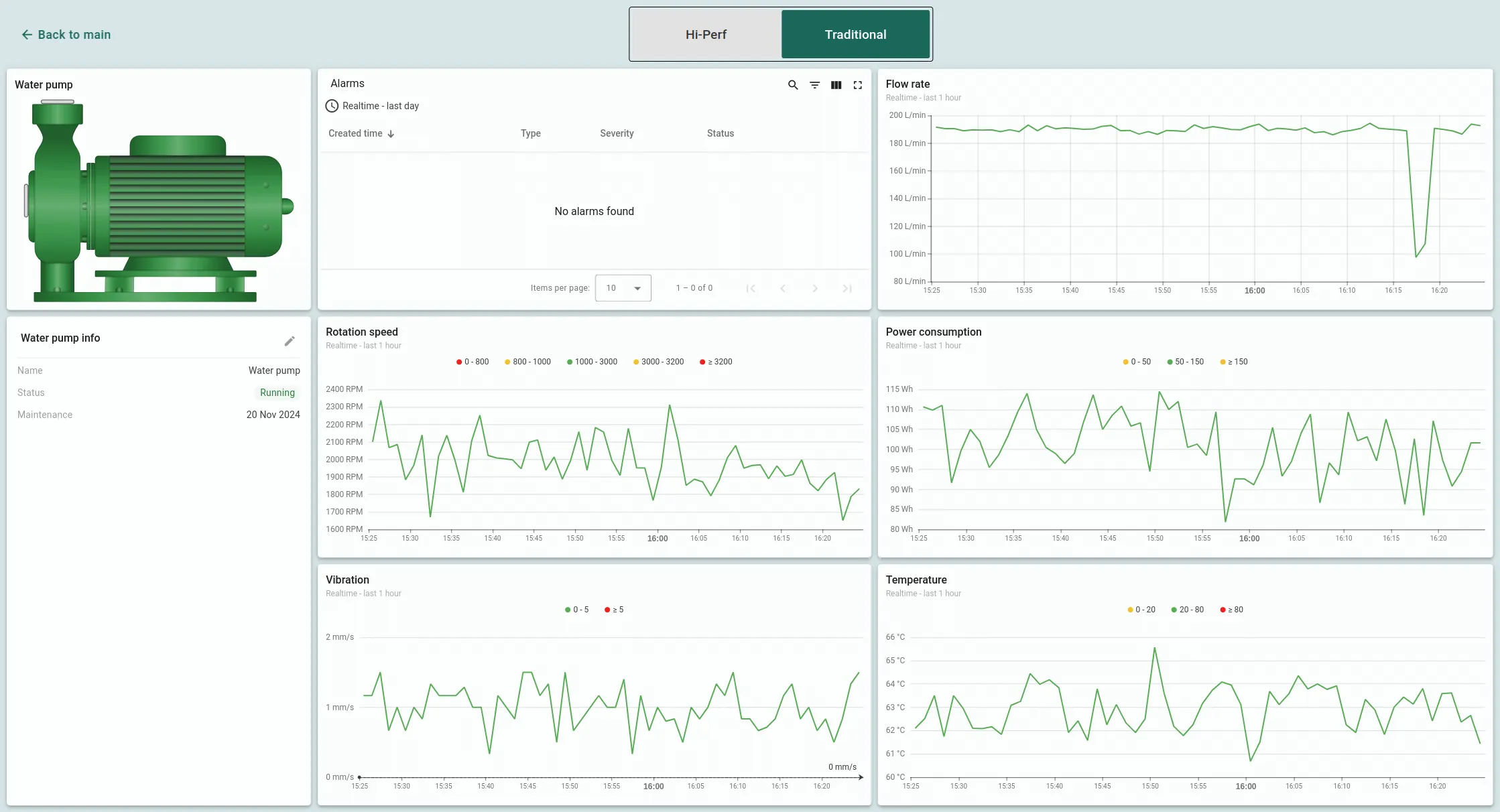
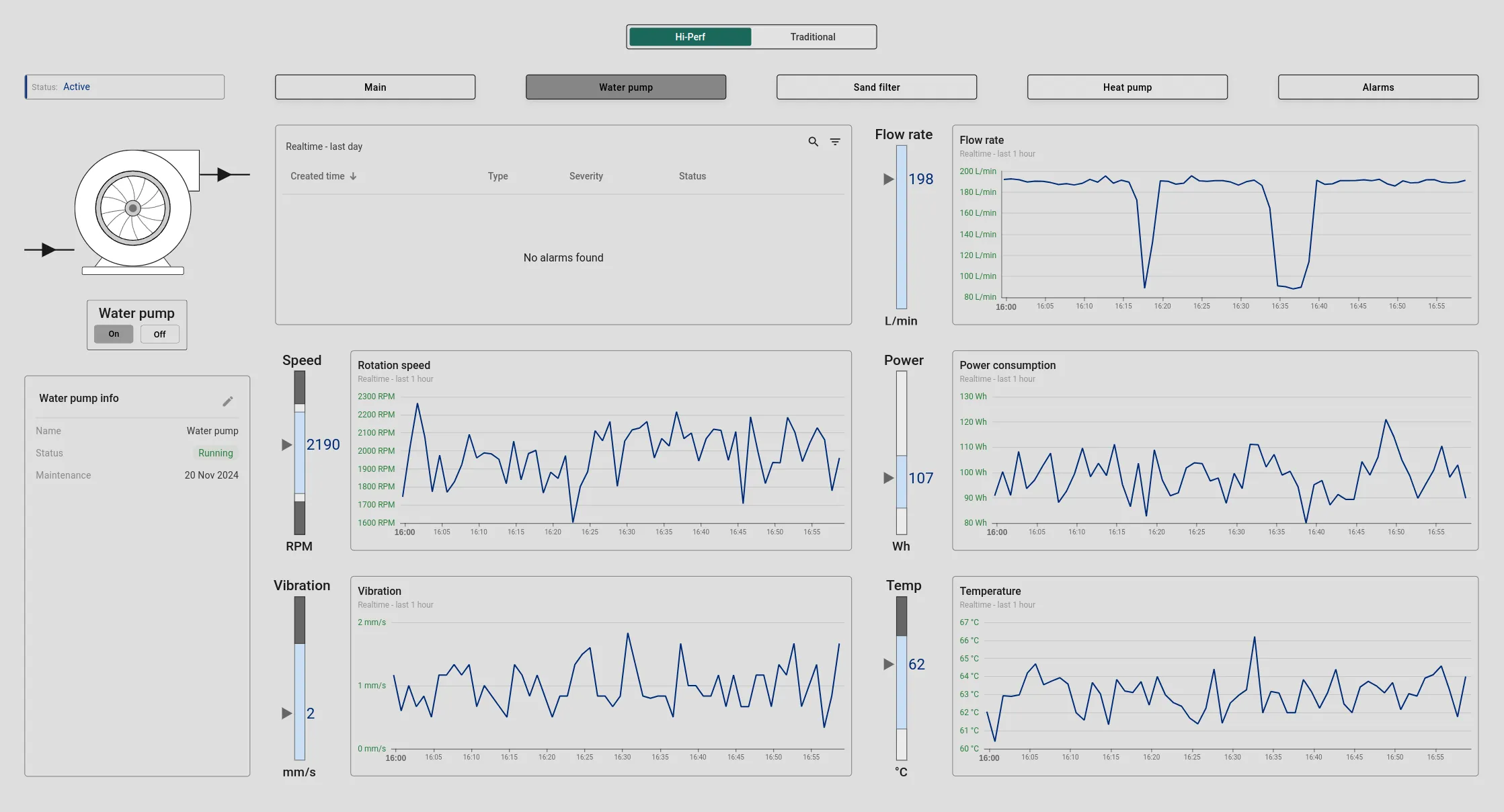
This feature enables real-time monitoring of critical parameters like flow rate, temperature, rotation speed, vibration, and power consumption. It also provides information on the pump's status and last maintenance. An alarm widget is integrated for rapid response to any issues, ensuring that any malfunctions can be quickly addressed and resolved.
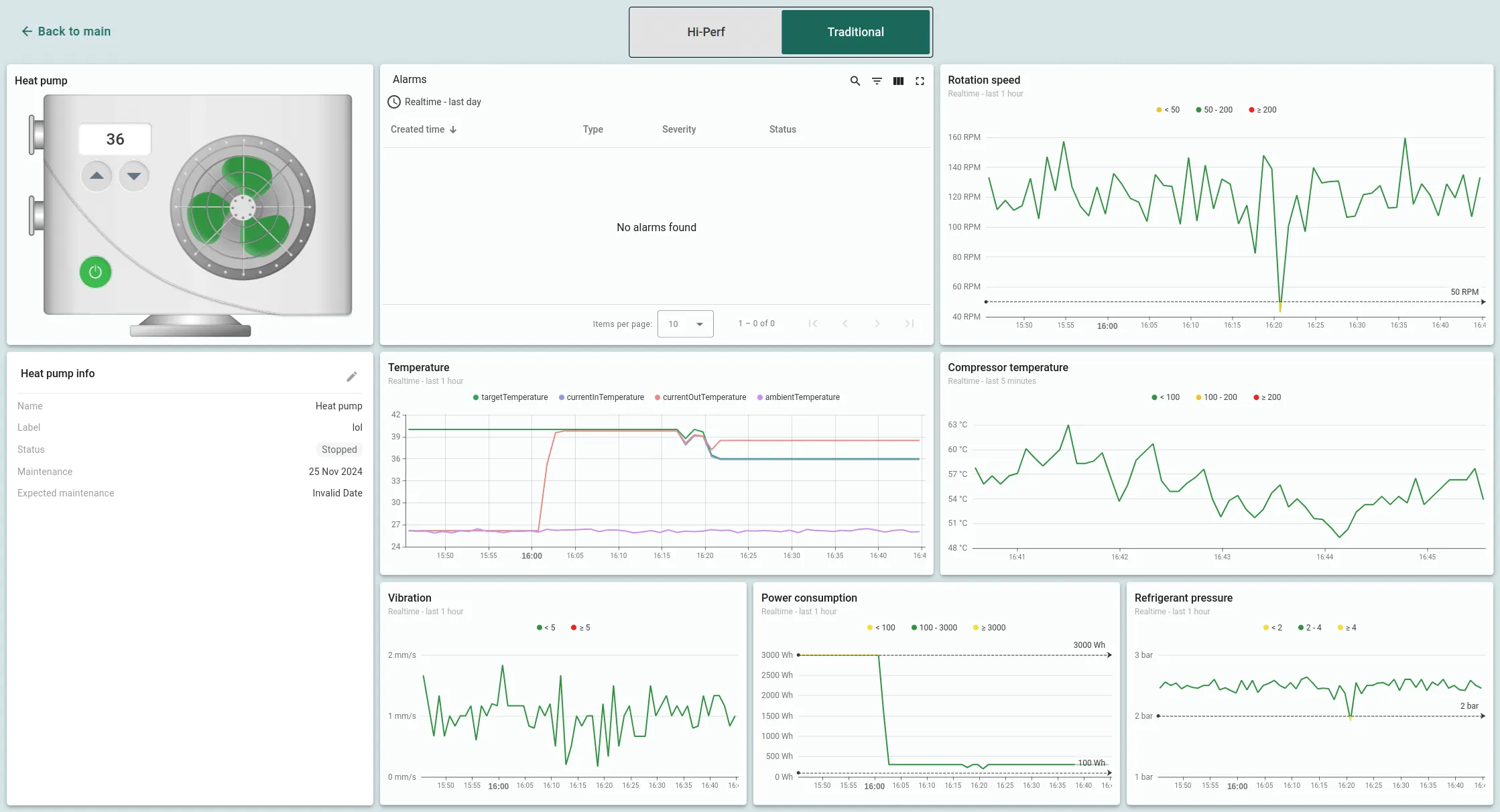
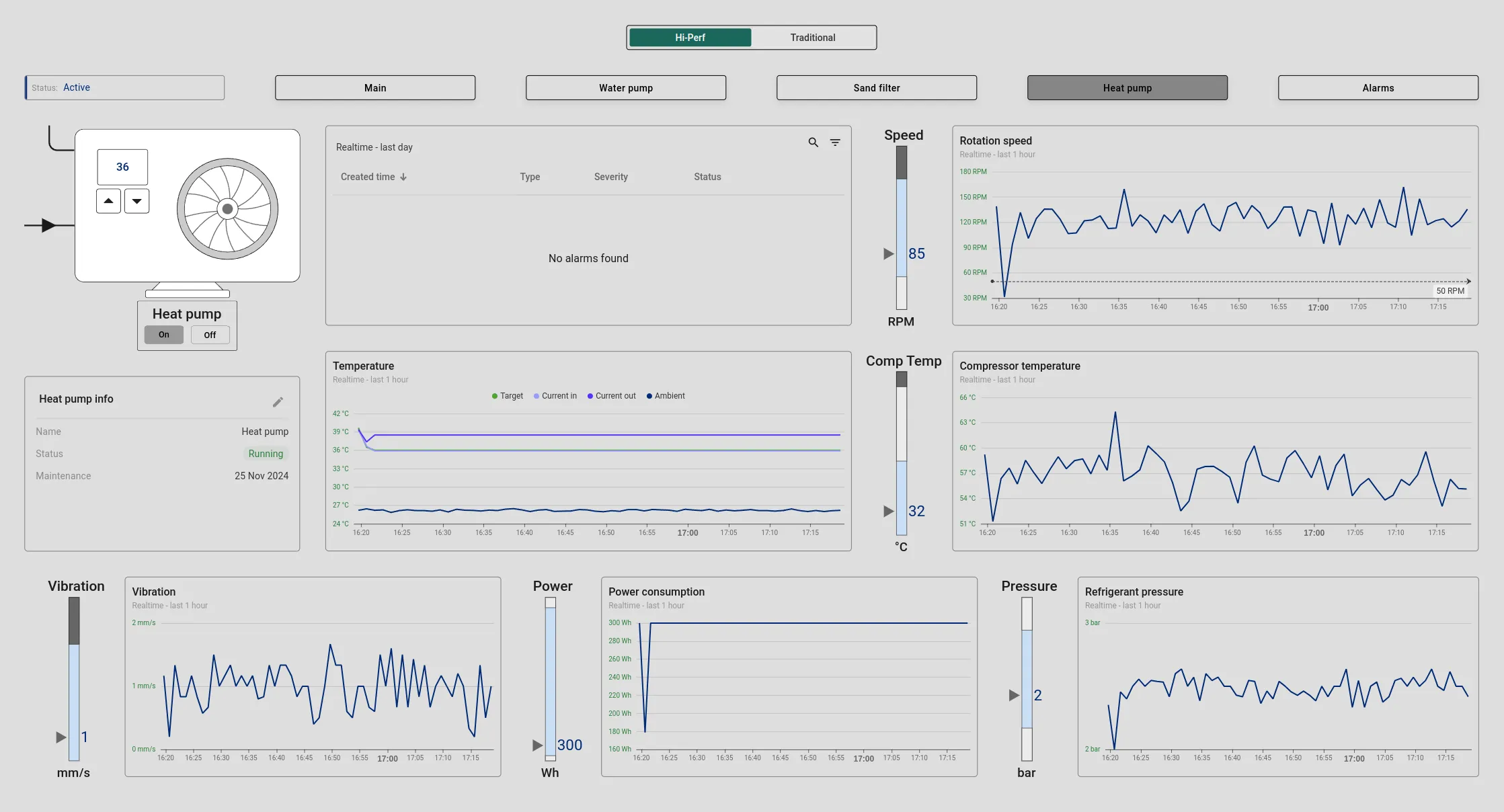
This screen offers a comprehensive view of the heat pump's performance, including indicators like temperature, rotation speed, vibration, refrigerant pressure, and power consumption. Key data, such as inlet and outlet water temperatures, the desired pool water temperature, and the ambient air temperature, are displayed. Based on these inputs, the heat pump will automatically switch on or off. Operators can adjust the pool water temperature directly from the heat pump widget and also view information about the filter's status and the last maintenance date. An alarm widget ensures that any malfunctions are quickly addressed in real time.
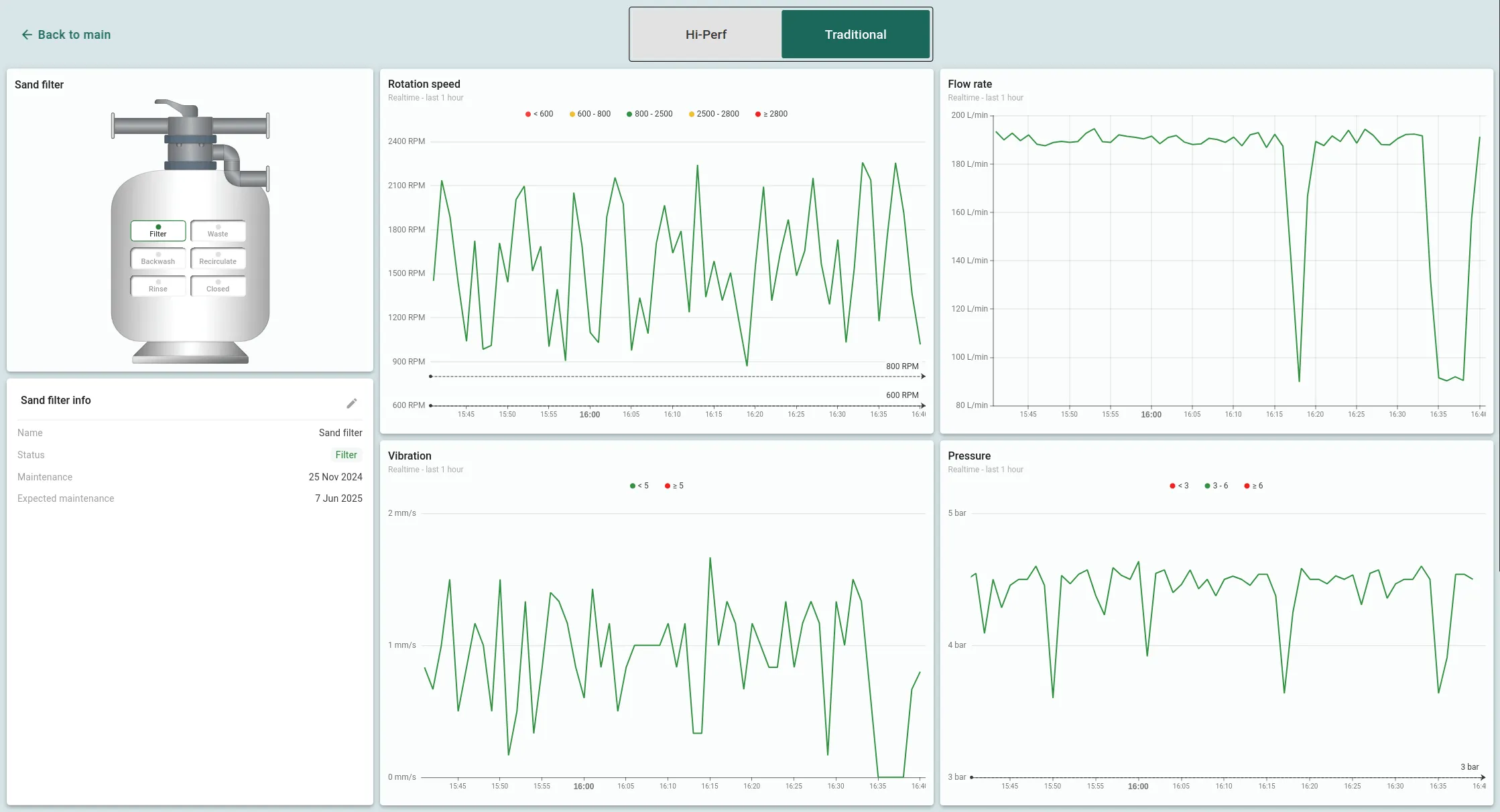
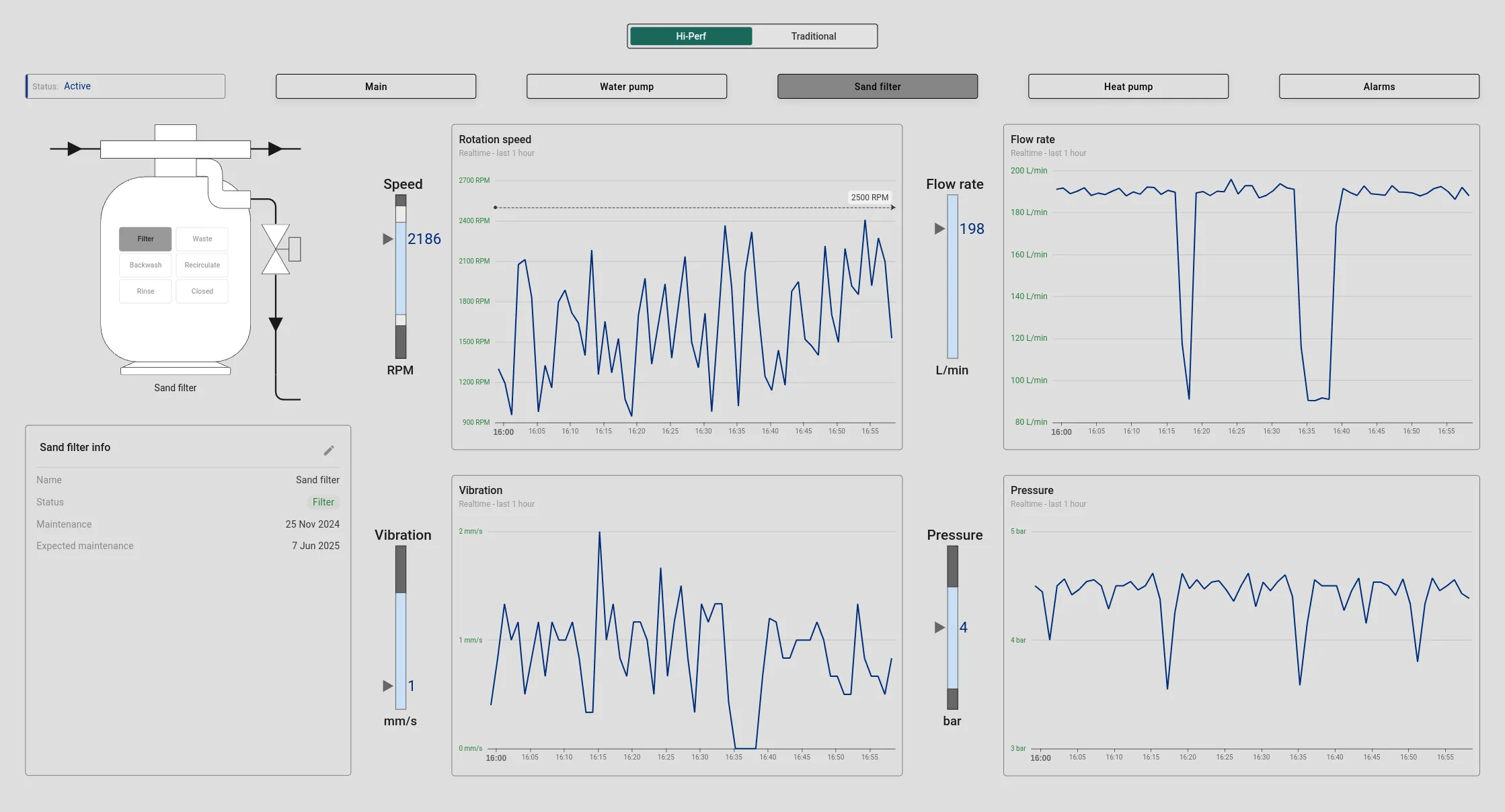
The sand filter state provides detailed monitoring of flow rate, pressure, rotation speed, and vibration. It also displays the filter's current mode, last maintenance date, and next scheduled service. Operators can easily switch filter modes directly from the widget, for example, from filtration to water draining (waste mode) with a simple click on the mode display.
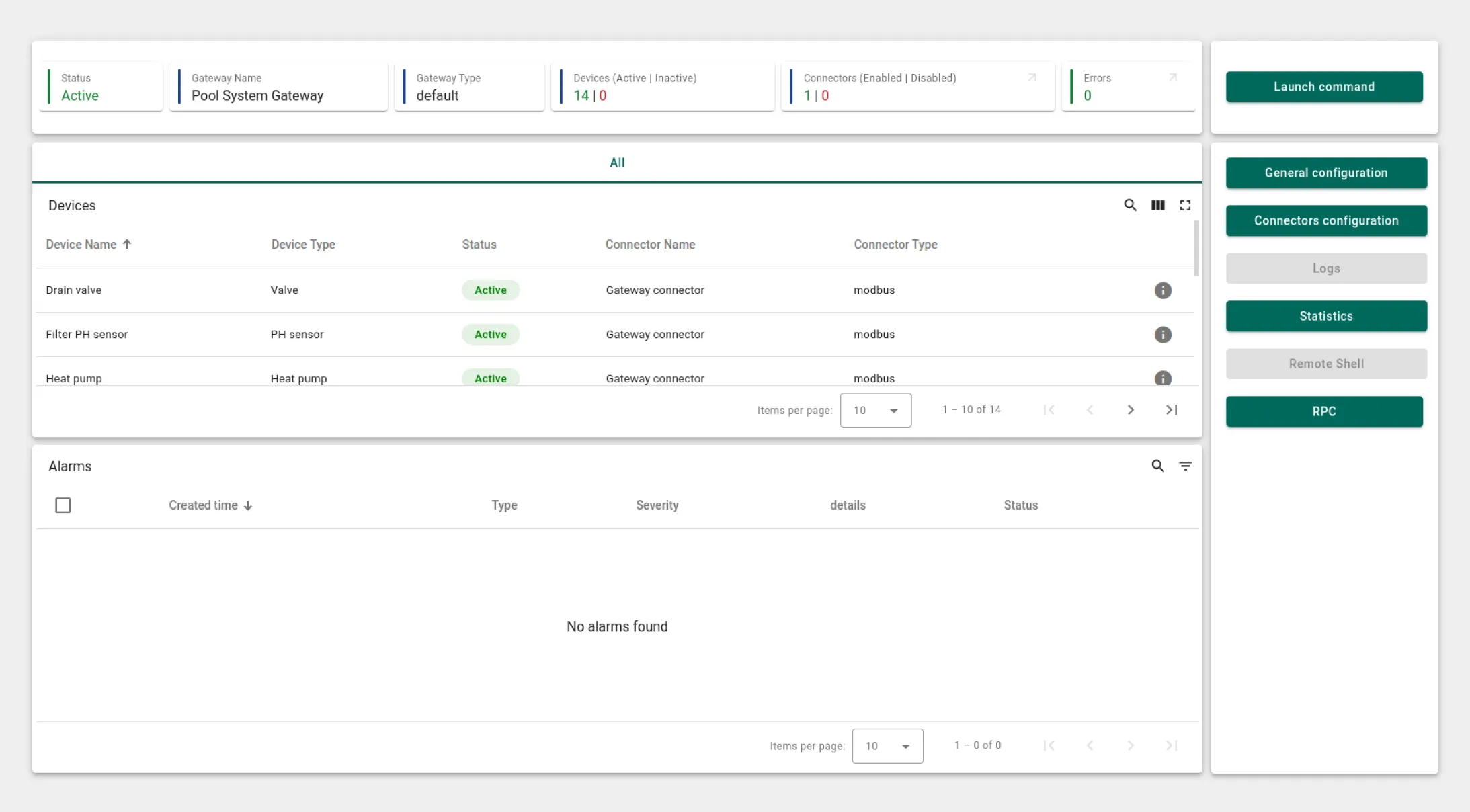
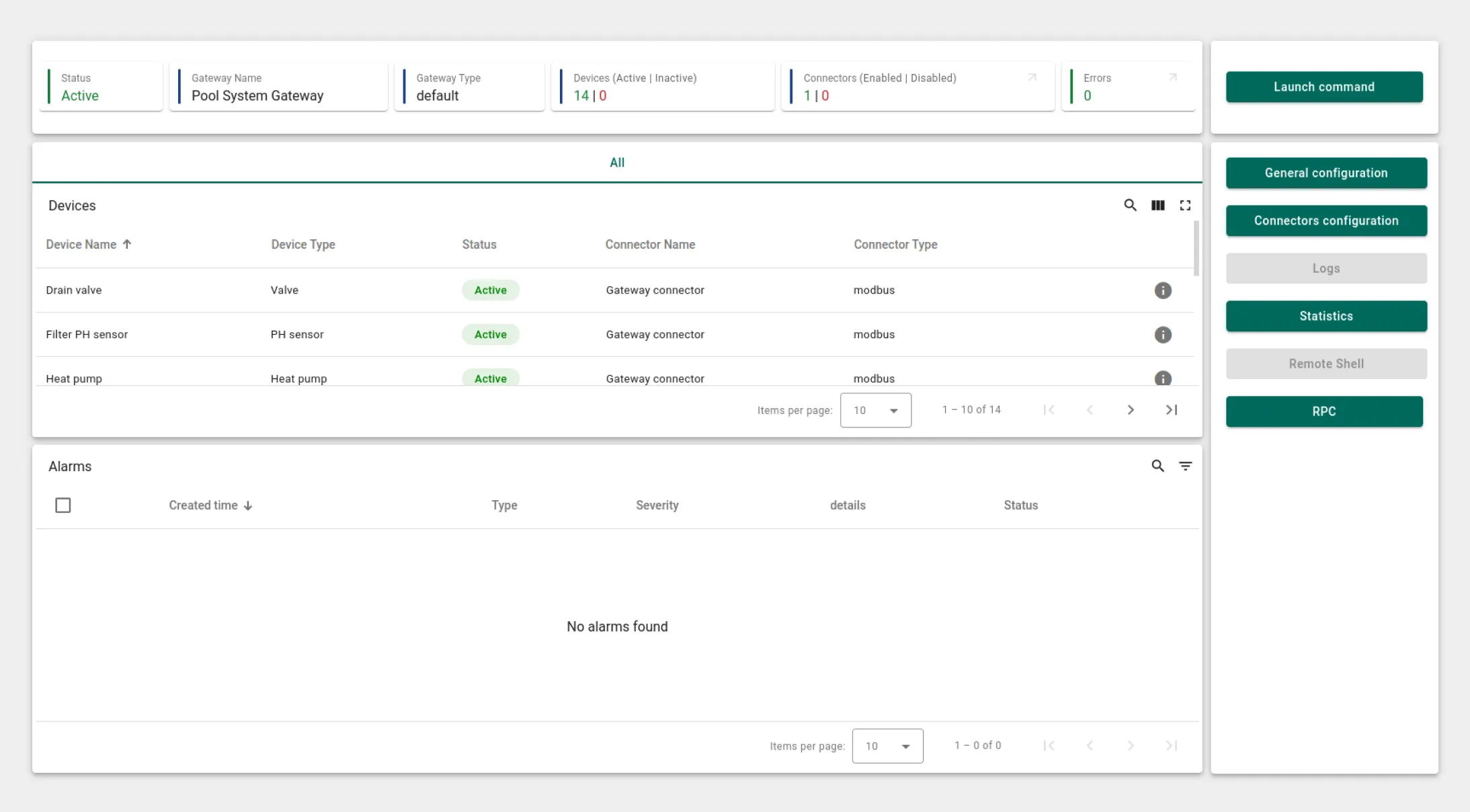
An essential component of this solution is the Gateway, which integrates all devices using an emulator. To simulate the entire swimming pool system, a Modbus emulator is employed, combining 14 individual devices. These devices operate as a unified system, communicating seamlessly via the Modbus protocol. For real-time monitoring of device data received from Modbus servers, the ThingsBoard IoT Gateway dashboard provides a clear view of the status and data from all connected devices, allowing operators to monitor and manage the system effortlessly.
Swimming pool SCADA system state

This interactive state allows operators to monitor the pool's water level, temperature, and equipment operation. In real time, users can heat the pool, drain it, or fill it with water. By interacting with the on-screen widgets for water level, temperature, the filter sensor, and the pH filter, operators can access and control readings directly from a single dashboard.

Swimming pool SCADA system state dashboard

Water pump state

This feature enables real-time monitoring of critical parameters like flow rate, temperature, rotation speed, vibration, and power consumption. It also provides information on the pump's status and last maintenance. An alarm widget is integrated for rapid response to any issues, ensuring that any malfunctions can be quickly addressed and resolved.

Water pump state dashboard

Heat pump state

This screen offers a comprehensive view of the heat pump's performance, including indicators like temperature, rotation speed, vibration, refrigerant pressure, and power consumption. Key data, such as inlet and outlet water temperatures, the desired pool water temperature, and the ambient air temperature, are displayed. Based on these inputs, the heat pump will automatically switch on or off. Operators can adjust the pool water temperature directly from the heat pump widget and also view information about the filter's status and the last maintenance date. An alarm widget ensures that any malfunctions are quickly addressed in real time.

Heat pump state dashboard

Sand filter state

The sand filter state provides detailed monitoring of flow rate, pressure, rotation speed, and vibration. It also displays the filter's current mode, last maintenance date, and next scheduled service. Operators can easily switch filter modes directly from the widget, for example, from filtration to water draining (waste mode) with a simple click on the mode display.

Sand filter state dashboard

Gateway

An essential component of this solution is the Gateway, which integrates all devices using an emulator. To simulate the entire swimming pool system, a Modbus emulator is employed, combining 14 individual devices. These devices operate as a unified system, communicating seamlessly via the Modbus protocol. For real-time monitoring of device data received from Modbus servers, the ThingsBoard IoT Gateway dashboard provides a clear view of the status and data from all connected devices, allowing operators to monitor and manage the system effortlessly.

Gateway dashboard

Swimming pool SCADA system state

Water pump state

Heat pump state

Sand filter state

Gateway

This interactive state allows operators to monitor the pool's water level, temperature, and equipment operation. In real time, users can heat the pool, drain it, or fill it with water. By interacting with the on-screen widgets for water level, temperature, the filter sensor, and the pH filter, operators can access and control readings directly from a single dashboard.

This feature enables real-time monitoring of critical parameters like flow rate, temperature, rotation speed, vibration, and power consumption. It also provides information on the pump's status and last maintenance. An alarm widget is integrated for rapid response to any issues, ensuring that any malfunctions can be quickly addressed and resolved.

This screen offers a comprehensive view of the heat pump's performance, including indicators like temperature, rotation speed, vibration, refrigerant pressure, and power consumption. Key data, such as inlet and outlet water temperatures, the desired pool water temperature, and the ambient air temperature, are displayed. Based on these inputs, the heat pump will automatically switch on or off. Operators can adjust the pool water temperature directly from the heat pump widget and also view information about the filter's status and the last maintenance date. An alarm widget ensures that any malfunctions are quickly addressed in real time.

The sand filter state provides detailed monitoring of flow rate, pressure, rotation speed, and vibration. It also displays the filter's current mode, last maintenance date, and next scheduled service. Operators can easily switch filter modes directly from the widget, for example, from filtration to water draining (waste mode) with a simple click on the mode display.

An essential component of this solution is the Gateway, which integrates all devices using an emulator. To simulate the entire swimming pool system, a Modbus emulator is employed, combining 14 individual devices. These devices operate as a unified system, communicating seamlessly via the Modbus protocol. For real-time monitoring of device data received from Modbus servers, the ThingsBoard IoT Gateway dashboard provides a clear view of the status and data from all connected devices, allowing operators to monitor and manage the system effortlessly.

Swimming pool SCADA system state

This interactive state allows operators to monitor the pool's water level, temperature, and equipment operation. In real time, users can heat the pool, drain it, or fill it with water. By interacting with the on-screen widgets for water level, temperature, the filter sensor, and the pH filter, operators can access and control readings directly from a single dashboard.

Swimming pool SCADA system state dashboard

Water pump state

This feature enables real-time monitoring of critical parameters like flow rate, temperature, rotation speed, vibration, and power consumption. It also provides information on the pump's status and last maintenance. An alarm widget is integrated for rapid response to any issues, ensuring that any malfunctions can be quickly addressed and resolved.

Water pump state dashboard

Heat pump state

This screen offers a comprehensive view of the heat pump's performance, including indicators like temperature, rotation speed, vibration, refrigerant pressure, and power consumption. Key data, such as inlet and outlet water temperatures, the desired pool water temperature, and the ambient air temperature, are displayed. Based on these inputs, the heat pump will automatically switch on or off. Operators can adjust the pool water temperature directly from the heat pump widget and also view information about the filter's status and the last maintenance date. An alarm widget ensures that any malfunctions are quickly addressed in real time.

Heat pump state dashboard

Sand filter state

The sand filter state provides detailed monitoring of flow rate, pressure, rotation speed, and vibration. It also displays the filter's current mode, last maintenance date, and next scheduled service. Operators can easily switch filter modes directly from the widget, for example, from filtration to water draining (waste mode) with a simple click on the mode display.

Sand filter state dashboard

Gateway

An essential component of this solution is the Gateway, which integrates all devices using an emulator. To simulate the entire swimming pool system, a Modbus emulator is employed, combining 14 individual devices. These devices operate as a unified system, communicating seamlessly via the Modbus protocol. For real-time monitoring of device data received from Modbus servers, the ThingsBoard IoT Gateway dashboard provides a clear view of the status and data from all connected devices, allowing operators to monitor and manage the system effortlessly.

Gateway dashboard
Versatile implementation

Applications of SCADA systems

Water and wastewater management

Ensuring continuous water supply and efficient wastewater treatment is made easier through precise control and management of systems.

Food industry

Product quality control is achieved through precise management of processes like mixing, heating, and cooling of liquids.

Energy and heating

Optimization of heating, ventilation, and air conditioning (HVAC) systems becomes more efficient with accurate control of flows and temperatures.

Water valve
Oil pump
Food conveyor
Chemical plant
Power plant

Oil and gas industry

From extraction to refining, SCADA symbols help manage complex processes, ensuring the safety and efficiency of operations.

Chemical industry

Filter symbols provide visualization and control over filtration processes, ensuring the cleanliness and safety of the liquids being used in the system.

Water valve

Water and wastewater management

Ensuring continuous water supply and efficient wastewater treatment is made easier through precise control and management of systems.

Oil pump

Oil and gas industry

From extraction to refining, SCADA symbols help manage complex processes, ensuring the safety and efficiency of operations.

Food conveyor

Food industry

Product quality control is achieved through precise management of processes like mixing, heating, and cooling of liquids.

Chemical plant

Chemical industry

Filter symbols provide visualization and control over filtration processes, ensuring the cleanliness and safety of the liquids being used in the system.

Power plant

Energy and heating

Optimization of heating, ventilation, and air conditioning (HVAC) systems becomes more efficient with accurate control of flows and temperatures.